VMware
- VMware is a virtualization and cloud computing software provider for x86-compatible computers.
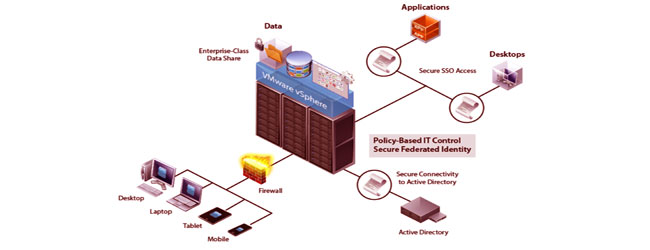
VMware's software allows users to create multiple virtual environments, or virtual computer systems, on a single computer or server. Essentially, one computer or server could be used to host, or manage, many virtual computer systems, sometimes as many as one hundred or more. The software virtualizes hardware components such as the video card, network adapters, and hard drive. For businesses, this is especially useful for setting up multiple server systems without having to purchase separate hardware for each of them. They can create virtual servers using VMware's software to save time and money.
-
- The X86 compatible hardware of today, regardless of processor count or core count, was designed to run a single operating system. This leaves most machines vastly underutilized. VMware virtualization lets you run multiple virtual machines on a single physical machine, with each virtual machine sharing the resources of that one physical computer across multiple environments. Different virtual machines can run different operating systems and multiple applications on the same physical computer. WMware is an operating system that sits directly on the hardware and is the interface between the hardware and the various operating system. It expands the hardware, from the users point of view, to many different independent servers all with their own processors and memory. These virtual servers cannot be distinguished from physical servers by the end users.
-
- VMware works by loading a small, efficient operating system, or hypervisor directly on the host hardware. The VMware hypervisor has a small footprint and is extremely efficient, with a very small (1%) overhead. Device drivers for nearly all major brand devices are available from VMware. These are loaded during the configuration process.
-
- The client operating systems, such as Microsoft® Server 2008, Microsoft® Small Busines Server, Linux varieties, etc. are then set up as virtual machines, working directly with the VMware layer rather than with the actual hardware. This allows replacement of hardware to be very simple. If the hardware is replaced, VMware is reconfigured for the new hardware, and the virtual guest operating systems see no change whatsoever and are immediately able to boot and operate.
-
- In non-technical terms, VMWare allows a company or programmer to configure a software program and an operating system for use and "wrap" them together as a "virtual appliance" so that no installation, setup, or configuration is required for the end user (beyond the installation and configuration of VMWare).
-
- Virtual appliances can be particularly useful for legacy applications that may have been designed for an operating system no longer in widespread use or one that is not compatible with the underlying hardware.
-
Benefits from Virtualization
- Reduce capital and operating costs.
- Deliver high application availability.
- Minimize or eliminate downtime.
- Increase IT productivity, efficiency, agility and responsiveness.
- Speed and simplify application and resource provisioning.
- Support business continuity and disaster recovery.
- Enable centralized management.
- Build a true Software-Defined Data Center.
VMware’s industry-leading platform supports all levels of virtualization, from desktop and server virtualization to a full-fledged Software-Defined Data Center